
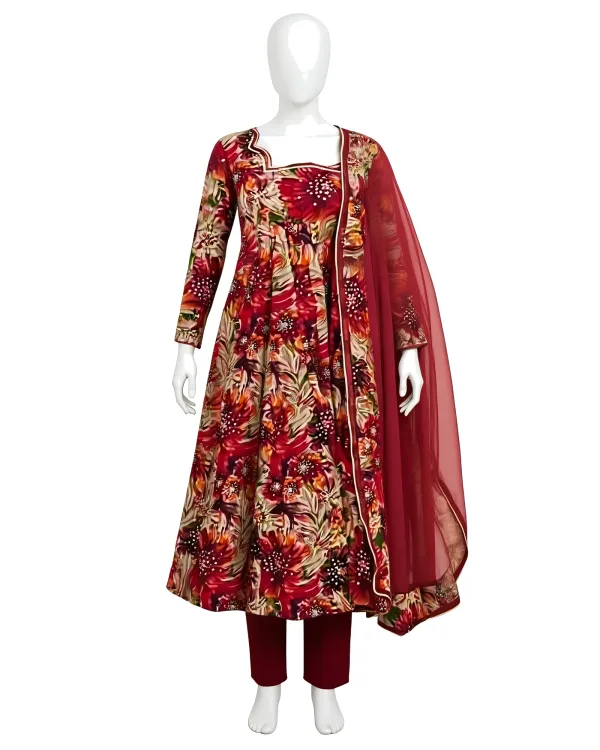

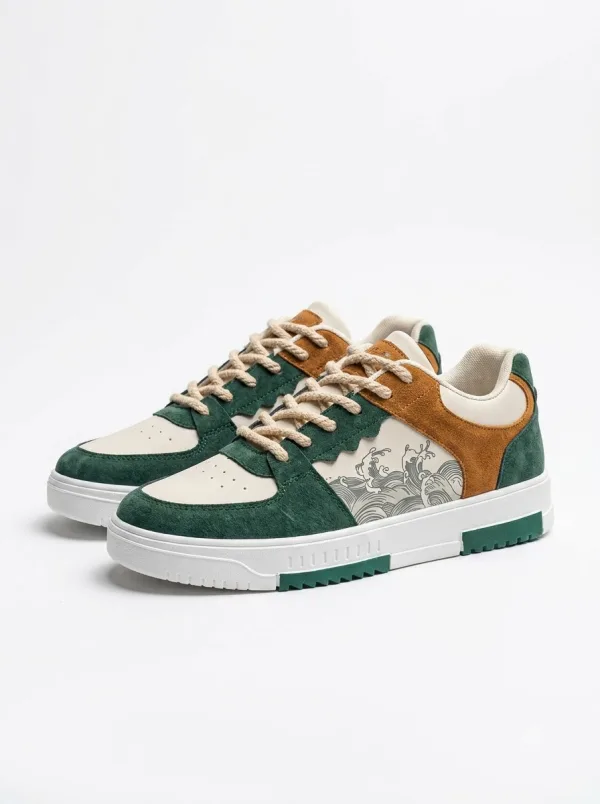


When a customer in Chandigarh or Mohali opens your product page, the first thing they see is not your shop name. It is the photo. A clear picture builds trust in seconds. A dark, cluttered or cropped shot makes even a good product look doubtful. That is why product photos for online selling matter so much for local shops that want to go online.
This checklist is for boutique owners, footwear stores, beauty counters and home decor shops across Chandigarh, Mohali, Panchkula, Zirakpur and Kharar. You do not need a studio. A smartphone, daylight and patience are enough.
If you are still deciding whether to sell online at all, read our earlier guide on why Tricity local shops should sell online, then come back here when you are ready to shoot.
Why Product Photos Decide Whether Someone Clicks Buy
In a physical shop, the customer can touch the fabric, check the weight of a bag or walk around a diya set. Online, the photo has to do that work. Buyers look for:
- What the product really looks like — colour, print, shape and finish
- Scale — how big it is compared to a person or a common object
- Detail — stitching, texture, print edges, packaging if it matters
- Honesty — whether the photos match what they will receive
Hinglish tip many Tricity sellers already hear: "photo clear hona chahiye, warna trust nahi hota". Clear photos reduce questions and returns.
What You Need Before You Start Shooting
Keep the setup simple. Most shops already have what they need.
- A smartphone with a clean camera lens (wipe it; fingerprints make soft, hazy shots)
- Daylight near a window, or a shaded outdoor spot. Avoid harsh noon sun that creates hard shadows
- A plain background — white chart paper, a clean wall, a bedsheet without prints, or a foam board from a stationery shop
- A table or floor space so the product sits steady
- Optional: a cheap clip light for evenings, and a small tripod or a stack of books to keep the phone still
You do not need expensive lights on day one. Consistency matters more than fancy gear.
The Shot List: Photos Every Listing Should Have
Aim for a small set of clear images rather than twenty casual snaps. For most fashion, beauty and home products, this list works well:
- Hero shot (front): the full product centred on a plain background. This is usually the first image buyers see.
- Back or second angle: especially important for hoodies, kurtas, bags and decor pieces with a different reverse side.
- Close-up of detail: print, lace, fabric weave, zipper, embroidery or finish.
- Colour variants: if you sell the same design in maroon, green, mustard and more, show each colour clearly.
- Scale or context (optional but useful): a folded set with a measuring tape in frame, or the product held against a mannequin or simple hanger — without hiding the product itself.
For a 3-piece ethnic set, show every piece. For footwear, shoot the pair plus a side profile. For home decor, include one shot that shows approximate size.
Lighting and Background: Simple Rules That Work
Light: Soft daylight works best. Face the product toward the window; do not backlight it into a silhouette. Turn off yellow room lights when daylight is enough — mixed light skews colour.
Background: Plain white or light grey keeps colours true. Busy shelves, patterned sheets and price tags in frame distract buyers.
Shadows and colour: Soft shadows are fine; hard black shadows usually mean light is too harsh. Do not over-filter. A maroon kurta that looks pink online creates returns.
Phone Camera Settings and Framing Tips
- Clean the lens every time
- Use the main rear camera, not the ultra-wide, so the product does not look warped
- Tap to focus on the product, then lock exposure if your phone allows it
- Fill most of the frame with the product; leave a little margin so edges are not cut off
- Keep the phone parallel to the product for flat lays; tilt only when you want a deliberate angle
- Shoot a little higher resolution than you think you need, so close-ups stay sharp after cropping
If your hands shake, rest your elbows on the table or use a timer. Blurry photos are the fastest way to lose a click.
What Not to Do in Product Photos
- Do not leave handwritten MRP stickers or shop visiting cards in the frame
- Do not crop heads, sleeves or shoe toes by accident
- Do not use only lifestyle stock photos with no real product shot
- Do not mix five different backgrounds across one listing
- Do not stretch or squeeze the image to "fit" a square — it makes proportions wrong
- Do not hide damage or stains and hope the buyer will not notice
Buyers on marketplaces compare. Honest, consistent photos win more trust than glamorous but misleading ones. Our buyer safety guide also tells shoppers to look for multiple clear photos — so meeting that bar helps both sides.
Category-Wise Quick Notes for Tricity Shops
Women's fashion: Show full length when possible, neckline close-up, and fabric drape. For sets, photograph every piece. Browse how listings look in Women's Fashion on BuyDost.
Men's fashion: Front, back and print close-up for hoodies and sweatshirts. Keep the garment flat or on a simple hanger. See Men's Fashion.
Footwear: Pair shot, side profile, sole if the tread matters, and a detail of branding or stitching. Category: Footwear.
Beauty and wellness: Label text should be readable. Cap, bottle shape and pack size should be obvious. Avoid heavy glare on glossy bottles. See Beauty and Wellness.
Home decor: One hero shot plus a detail of finish. Keep backgrounds calm so metal, glass or paint colour stays true. See Home Decor.
Accessories: Bags need front, interior (if useful) and strap detail. See Accessories.
After the Shoot: Prepare Files for Upload
- Pick the sharpest frame for each angle
- Crop evenly and straighten tilted shots
- Export as JPEG or WebP without crushing quality
- Name files clearly (for example maroon-kurta-front.jpg)
- Write an honest description (fabric, inclusions, care). On BuyDost, keep prices out of description text — use the price fields only
Good photos plus clear details make a listing feel ready. See how storefronts look on BuyDost shops.
How This Fits With Selling on BuyDost
BuyDost is building a marketplace for India with a focus on Chandigarh Tricity sellers. Clear photos make onboarding smoother and help buyers trust what they see.
Getting started is simple:
- Open the Sell on BuyDost page and share your shop details
- Talk to the team about your products and current terms before you decide
- Upload products with photos, accurate details and stock
- Go live so Tricity and all-India buyers can discover your shop
More answers sit on our FAQs page. If you want the bigger picture first, revisit selling online in Chandigarh Tricity.
Frequently Asked Questions
Do I need a professional camera to sell online?
No. A recent smartphone with good daylight and a plain background is enough for most fashion, beauty and home products. Focus on clarity, true colour and a consistent style across your listings.
What background is best for product photos?
A plain white or light grey background works best. It keeps attention on the product and makes colours easier to judge. Avoid busy shelves and patterned fabrics behind the item.
How many photos should each product have?
Aim for at least three: a clear front hero shot, a second angle or back view, and one close-up of detail. Add more for colour variants or multi-piece sets.
Can I use filtered Instagram photos for my listings?
You can shoot on a phone, but avoid heavy filters that change colour. Buyers expect the delivered product to match the listing. Natural light and honest colour reduce returns.
How do I start selling on BuyDost after my photos are ready?
Go to the Sell on BuyDost page, submit your shop details, and wait for the team to contact you with the next steps and current terms. Have your photos and basic product details ready.
Which categories can Tricity shops list with these photo tips?
The same photo habits help across women's fashion, men's fashion, footwear, accessories, beauty, wellness, intimate care and home decor — the categories BuyDost already supports.
Take the Photos, Then Take the Next Step
You do not need a studio. You need daylight, a plain background, a steady hand and honest colour. Shoot one product properly this week, then repeat the setup for the rest of your shelf.
When you are ready, register your shop on BuyDost and join other Tricity sellers building clear listings buyers can trust.